
In the hyper-competitive world of Software as a Service (SaaS), the speed of execution is often the only moat a company has. Whether you are a seed-stage startup or an established enterprise moving to a multi-platform approach, your user interface (UI) is the window through which your customers perceive your value.
The heart of that experience? The dashboard.
However, building a high-performing, responsive, and visually stunning SaaS dashboard in Flutter is a monumental task. It involves more than just placing buttons on a screen; it requires complex data visualization, intricate navigation logic, and adaptive layouts. This is why more teams are turning to a Flutter dashboard UI kit to bridge the gap between concept and launch.
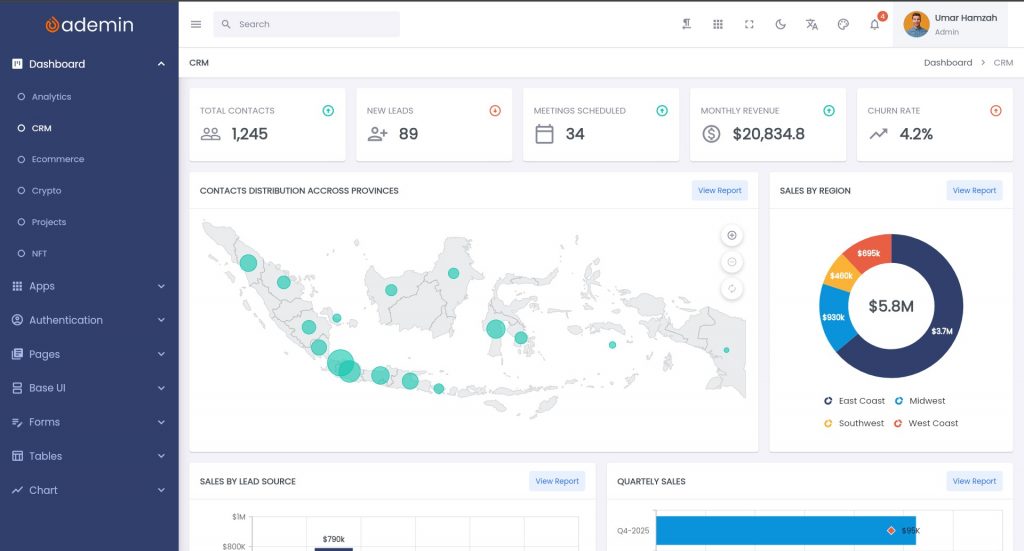
What Is a Flutter Dashboard UI Kit?
A Flutter dashboard UI kit is a comprehensive library of pre-designed, pre-coded, and customizable components specifically engineered for administrative and data-heavy interfaces. It isn’t just a collection of “pretty screens”; it is a foundational framework built on top of the Flutter SDK.
When you use a UI kit, you are essentially skipping the “foundation and framing” stage of building a house and moving straight to the interior design and functionality. These kits typically include:
- Atomic Flutter UI Components: Buttons, text fields, checkboxes, and switches that follow a unified design language.
- Complex Widgets: Data tables with pagination, multi-select filters, interactive charts (line, bar, pie, etc.), and calendars.
- Pre-Built Layouts: Sidebar architectures, top-bar navigation, and “Masonry” style grids for widgets.
- Ready-Made Pages: Profile settings, billing management, user tables, and authentication (Login/Sign-up) flows.
By leveraging a kit, developers can utilize high-quality Dart code that is already optimized for performance, leaving them free to focus on the unique backend logic that makes their SaaS product valuable.
The Anatomy of a Modern SaaS Dashboard
To understand why a kit is necessary, one must look at what a modern SaaS dashboard in Flutter actually requires. It’s no longer enough to show a few static numbers. Today’s users expect:
- Real-Time Data Visualization: Integrating libraries like
fl_chartorsyncfusion_flutter_chartsto show live business metrics. - Adaptive Responsiveness: The dashboard must work seamlessly on a 32-inch 4K monitor, a standard laptop, and a mobile tablet.
- Thematic Flexibility: Deep support for Light Mode and Dark Mode is now a standard requirement, not a “nice-to-have.”
- Accessibility (a11y): Ensuring that screen readers and keyboard navigation work perfectly for enterprise-grade software.
Common Use Cases for a Flutter Admin Dashboard
The beauty of Flutter is its versatility. A single codebase can power your web, desktop, and mobile admin panels. Here are the primary ways SaaS teams utilize these kits:
1. The Classic Admin Panel
Every SaaS needs a “God Mode”—an internal tool where your support and operations teams can manage users, reset passwords, monitor server health, and handle refunds. Using a Flutter admin dashboard for internal tools ensures your team has a professional, high-performance environment without wasting months of engineering time on tools that customers never see.
2. Customer-Facing Analytics
If your SaaS provides data (like a marketing tool or a financial platform), your users need a way to digest that information. A UI kit provides the complex charting components needed to turn raw SQL data into beautiful, actionable insights for your end-users.
3. CRM and Project Management
Managing relationships and tasks requires complex lists, Kanban boards, and detailed “Card” views. A UI kit provides the structural components to build these interfaces, ensuring that the “Draggable” and “Scrollable” behaviors are smooth and bug-free.
4. E-commerce Vendor Portals
If you are building a marketplace, your vendors need to track sales, upload products, and manage inventory. A Flutter dashboard UI kit allows you to deploy a sophisticated vendor portal that feels as premium as your consumer-facing app.
Key Benefits for Development Teams
Why should a CTO or a Lead Developer advocate for a UI kit? The reasons go beyond just “saving time.”
Accelerated Time-to-Market
In SaaS, the first-mover advantage is real. If it takes you six months to build a custom dashboard and your competitor launches in two months using a kit, you’ve already lost the initial market share. A UI kit can reduce the frontend development timeline by 60% to 80%.
Drastic Cost Reduction
Consider the math:
- Custom Route: 1 Senior Designer (2 weeks) + 1 Senior Frontend Developer (4 weeks) = ~$15,000+ in salary/overhead.
- UI Kit Route: 1 License (~$50-$200) + 1 Developer (1 week of customization) = ~$3,000.
The savings are astronomical, especially for bootstrapped startups.
Design Consistency and Systematization
When multiple developers work on a project, “CSS/Style Creep” is inevitable. One dev might use a 4px border radius, while another uses 8px. A Flutter dashboard UI kit enforces a Design System. Every component is part of a cohesive family, ensuring that the app feels polished and professional.
Multi-Platform Ready
Flutter’s greatest strength is its ability to target Web, macOS, Windows, and Linux. High-quality kits are designed with LayoutBuilder and MediaQuery logic already baked in. This means your dashboard will automatically adjust its sidebar from a permanent drawer on Desktop to a hamburger menu on Mobile.
When a UI Kit Makes More Sense Than Custom UI
There is a common misconception that “custom is always better.” However, in software engineering, “custom” often means “untested” and “buggy.” Here is when you should definitely choose a kit over building from scratch:
| Feature | Custom UI | Flutter UI Kit |
|---|---|---|
| Development Speed | Slow (Months) | Fast (Days/Weeks) |
| Maintenance | High (You own all bugs) | Low (Handled by kit creator) |
| Responsiveness | Manual testing required | Pre-tested on all screens |
| Scalability | Depends on dev skill | Built on best practices |
| Budget | Expensive | Cost-effective |
Choose a UI Kit if:
- You are building an MVP to validate an idea.
- The dashboard is a utility (management) rather than the “hook” of the product.
- You have a small team of 1–3 developers.
- You need to support multiple platforms (Web/Desktop) immediately.
The Technical Edge: Why Flutter for Dashboards?
If you are deciding on a tech stack for your SaaS dashboard, Flutter offers several advantages over traditional React or Angular setups:
- No HTML/CSS Headaches: Everything in Flutter is a widget. You don’t have to worry about browser inconsistencies or CSS z-index issues.
- 60 FPS Performance: Flutter’s Skia/Impeller rendering engine ensures that even complex animations and data heavy-tables scroll smoothly.
- Single Language: Using Dart for both logic and UI makes the development process more “mentally fluid” for developers compared to jumping between JavaScript/TypeScript and HTML/CSS.
How FlutKit Solves These Problems
At FlutKit, we didn’t just build a template; we built a developer experience. We realized that many SaaS teams were struggling with poorly documented kits that were harder to customize than building from scratch.
We designed the FlutKit Flutter Dashboard UI Kit to solve the three biggest pain points in SaaS development:
1. Modular Architecture
We don’t use “spaghetti code.” Our components are modular. If you only need our advanced data tables, you can easily extract them without importing the entire library. This keeps your app’s bundle size small and your performance high.
2. State Management Agnostic
Whether your team prefers Provider, Bloc, GetX, or Riverpod, our UI kit is designed to be compatible. We provide the “View” layer, and we make it incredibly easy for you to hook up your “Controller” or “Business Logic” layer.
3. Extensive Documentation and Support
A UI kit is only as good as its documentation. FlutKit comes with clear guides on how to change themes, add new routes, and customize individual Flutter UI components.
4. Enterprise-Grade Widgets
Our kit includes widgets that are usually missing from free templates:
- Advanced Form Validation: Handling complex user inputs effortlessly.
- Customizable Data Grids: Export to CSV/PDF functionality patterns.
- Rich Text Editors: Integrated for CMS-style SaaS applications.
Strategic Implementation: How to Use a UI Kit Effectively
To get the most out of your Flutter dashboard UI kit, follow these three steps:
Step 1: Define Your Core User Flows
Before touching the code, map out what your user needs to do. Are they here to see a high-level overview (the Dashboard), or are they here to manage a list (the Table)? Use the kit’s pre-built layouts to match these needs.
Step 2: Customize the Theme
Don’t just use the default colors. Every high-quality kit allows you to change the ThemeData. Inject your brand’s primary colors, typography, and logo. Within an hour, the kit will look like it was designed specifically for your company.
Step 3: Integrate Your API
Because the UI is already built, your developers can spend 100% of their time on API integration. Connect your Flutter frontend to your Firebase, Node.js, or Go backend and start seeing real data flow through the beautiful charts.
Conclusion: Stop Reinventing the Wheel
In the SaaS world, the most successful companies are those that focus on their core value proposition. If you are building a Fintech app, your value is in your financial algorithms, not in the way your “Submit” button is coded. If you are building a HealthTech app, your value is in the patient data analysis, not the sidebar navigation logic.
Using a Flutter dashboard UI kit is not “cheating”—it’s being efficient. It’s a strategic decision to allocate your most expensive resource (developer time) toward the features that will actually make you money.
By choosing a solution like FlutKit, you ensure that your SaaS dashboard in Flutter is built on a foundation of clean code, responsive design, and modern aesthetics.
Ready to build your next big idea?
Don’t start from zero. Launch faster, reduce your overhead, and impress your users from day one.