
Every SaaS product eventually needs a dashboard. Whether it is used for user management, billing, analytics, or system configuration, the dashboard becomes the operational core of the application. It is where teams monitor data, control workflows, and make decisions.
For most teams, the default choice is to build the dashboard as a web application. Modern web stacks like React, Next.js, and Tailwind CSS make it relatively easy to create functional admin interfaces that can be deployed instantly and accessed from anywhere.
However, cross-platform applications are becoming a serious alternative. With modern UI frameworks capable of targeting web, desktop, and even mobile from a single codebase, some teams are reconsidering whether a browser-based dashboard is always the right choice.
So which approach should you take? Should your SaaS dashboard be a traditional web app, or should you build it as a cross-platform application?
This article explores the trade-offs between web-based and cross-platform SaaS dashboards, the technical and product implications of each, and how to choose the right architecture for your product.
What Is a SaaS Dashboard Platform?
A SaaS dashboard is the interface used by administrators, operators, or internal teams to manage the product and its data. Unlike marketing websites or consumer-facing features, dashboards are designed for:
- High information density
- Frequent daily use
- Operational control
- Long-term maintainability
Common SaaS dashboard use cases include:
- User and role management
- Subscription and billing configuration
- Analytics and reporting
- System monitoring
- Feature toggles and settings
- Audit logs and operational tools
From a platform perspective, dashboards can be delivered in two main ways:
- Web-based dashboards, accessed through a browser
- Cross-platform dashboards, delivered as installed applications (desktop or mobile) and often sharing code with web builds
Each approach solves different problems and introduces different constraints.
The Web App Approach
Web applications remain the dominant choice for SaaS dashboards. Most teams build admin panels using React, Vue, or similar frameworks, combined with a backend API and cloud hosting.
Advantages of Web-Based Dashboards
1. Instant Accessibility
Users can access the dashboard from any device with a browser. There is no installation process, which is especially important for public or customer-facing admin tools.
2. Familiar Technology Stack
Most developers are comfortable with web technologies. The ecosystem around React, Next.js, and Tailwind is mature and well-supported.
3. Easy Deployment and Updates
New features and fixes can be deployed instantly. Users always see the latest version without manual updates.
4. SEO and Linkability
Web dashboards can integrate with authentication flows, deep links, and browser navigation patterns. This is useful for SaaS platforms that expose parts of the admin panel publicly or rely on shareable URLs.
5. Lower Initial Complexity
Infrastructure for web dashboards is straightforward: host static assets, connect to APIs, and manage authentication.
Limitations of Web-Based Dashboards
Despite their popularity, web dashboards have structural limitations.
1. Performance Under Heavy UI Load
Large data tables, real-time charts, and log viewers can push browser rendering to its limits. Complex dashboards may suffer from slow rendering and excessive reflows.
2. Offline and Reliability Constraints
Web apps depend heavily on network availability. Offline-first behavior and local caching are difficult to implement reliably.
3. Limited System Integration
Browsers restrict access to file systems, hardware resources, and background processing. For some operational tools, this can be a serious limitation.
4. UI Inconsistency Across Browsers
Even with modern CSS and frameworks, subtle differences in rendering, scrolling, and fonts can appear between browsers and operating systems.
5. Long-Term Maintainability Risks
As dashboards grow, they often accumulate inconsistent UI patterns, ad hoc layouts, and duplicated components unless strict architectural discipline is enforced.
The Cross-Platform App Approach
A cross-platform dashboard is built using a framework that can target multiple platforms from a single codebase, such as desktop and web. These applications are typically distributed as installable software while still sharing UI and logic across platforms.
Advantages of Cross-Platform Dashboards
1. Single Codebase Across Platforms
Instead of maintaining separate implementations for web and desktop, a cross-platform approach allows teams to reuse most of the UI and business logic.
2. Predictable Performance
Cross-platform frameworks often render UI through their own engines instead of relying on browser layout engines. This enables smoother scrolling and more consistent rendering for complex dashboards.
3. Strong Offline Support
Installed applications can store data locally and synchronize when the network is available, making them more reliable for internal tools.
4. Deeper System Integration
Access to file systems, background services, and native APIs allows dashboards to perform tasks that are difficult or impossible in browsers.
5. Consistent UI Experience
Because rendering is controlled by the framework, the interface behaves the same across platforms, reducing visual fragmentation.
Limitations of Cross-Platform Dashboards
Cross-platform applications are not a universal solution.
1. Distribution Complexity
Users sometimes must install the application. Updates may require download or restart, depending on the update strategy.
2. Higher Initial Setup Cost
Setting up a cross-platform environment requires more configuration and tooling than a basic web app.
3. Learning Curve
Developers accustomed to web frameworks must learn new layout systems, component models, and tooling.
4. Deployment and Version Management
Managing versions across multiple operating systems introduces additional operational overhead.
5. Less Suitable for Public Dashboards
If your SaaS dashboard is meant for public or casual users, requiring installation may create unnecessary friction.
Key Decision Factors
Choosing between a web app and a cross-platform app is less about technology preference and more about product requirements.
Target Users
- Public customers: web apps are usually better
- Internal teams or enterprise users: cross-platform apps may be more appropriate
Internal dashboards often benefit from performance and offline reliability, while customer-facing dashboards prioritize accessibility.
Data Complexity
- Simple CRUD interfaces work well in browsers
- Real-time analytics, large tables, and monitoring systems benefit from more controlled rendering environments
Performance Requirements
If your dashboard must handle:
- Large datasets
- Frequent updates
- Complex charts
- Continuous background tasks
a cross-platform solution may provide a smoother experience.
Maintenance Cost
- Web apps typically require one codebase
- Cross-platform apps also use one codebase, but distribution and packaging add overhead
The real risk is not the platform, but UI inconsistency and architectural drift.
Product Lifecycle
- MVPs benefit from fast web deployment
- Long-term platforms benefit from structured UI systems and predictable performance
Architecture Comparison
| Factor | Web App | Cross-Platform App |
|---|---|---|
| Codebase | Web-only | Shared across platforms |
| Performance | Browser-limited | Engine-rendered UI |
| Offline Support | Limited | Strong |
| Deployment | Instant via browser | Browser, Installer or packaged app |
| System Access | Restricted | Deeper integration |
| UI Consistency | Browser-dependent | Fully controlled |
This table highlights that neither option is universally better. The choice depends on operational priorities.
Real-World SaaS Scenarios
Internal Admin Tools
Used by support and operations teams for user management, system configuration, and auditing. These tools benefit from stability, offline support, and consistent UI behavior. Cross-platform approaches work well here.
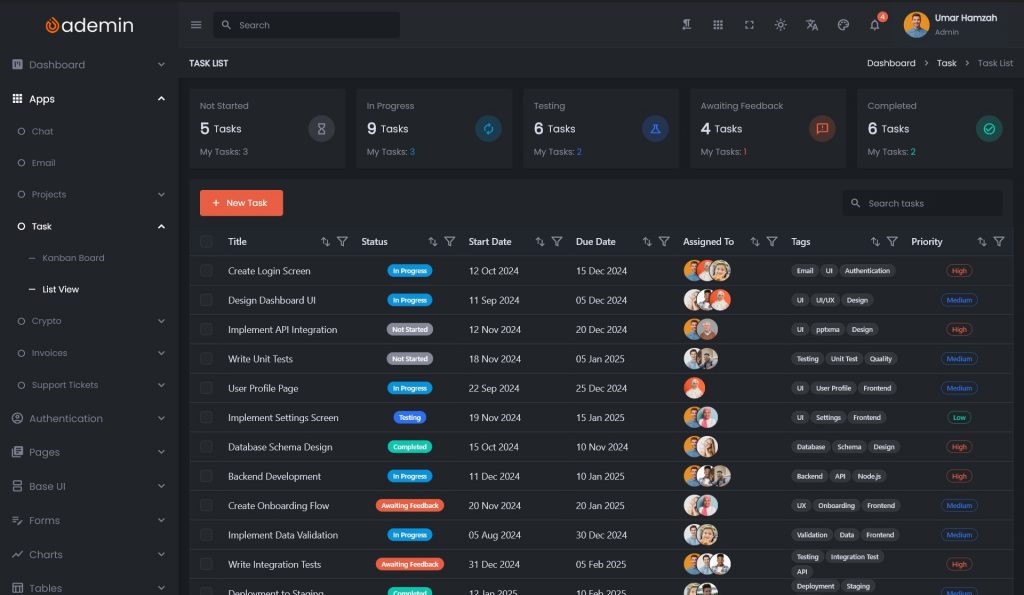
Analytics and Monitoring Dashboards
These dashboards display high-volume data, charts, and logs. Performance and rendering consistency matter more than SEO or public access.
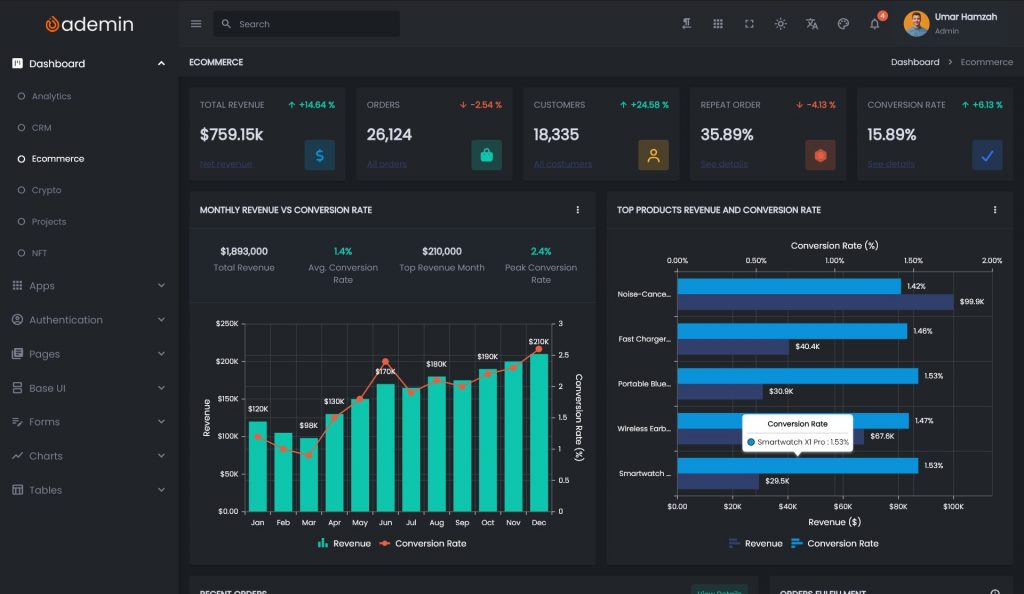
B2B Management Platforms
These systems manage customers, subscriptions, and workflows. They may combine public access with internal tools, sometimes requiring hybrid strategies.
Hybrid SaaS Products
Some SaaS platforms offer a web dashboard for customers and a dedicated cross-platform application for internal operators. In this case, sharing UI architecture across both platforms can reduce duplication.
Hybrid Strategy: One UI System, Multiple Platforms
Rather than thinking in terms of “web or cross-platform,” many teams now think in terms of:
One UI architecture, multiple delivery targets.
This strategy focuses on:
- Shared component systems
- Consistent layout rules
- Unified theming
- Predictable navigation patterns
With the right framework, it is possible to reuse most UI logic across platforms while adapting deployment to different environments.
This is where modern cross-platform UI frameworks become attractive. They allow teams to build a structured UI system once and deploy it to web and desktop targets with minimal divergence.
Why UI Architecture Matters More Than Platform
Platform choice matters, but architecture matters more.
Many dashboard projects fail not because of the wrong platform, but because of:
- Ad hoc layouts
- Duplicated components
- Mixed UI and business logic
- No design system
- No navigation structure
A scalable SaaS dashboard requires:
- Reusable UI components
- Centralized theming
- Modular feature organization
- Predictable layout rules
Without this structure, both web and cross-platform dashboards become difficult to maintain over time.
A well-designed UI system reduces:
- Refactoring risk
- Onboarding time
- Visual inconsistency
- Feature development cost
Who Should Choose Each Approach?
Choose a Web App If:
- Your dashboard is customer-facing
- You need SEO or public URLs
- You prioritize zero-install access
- Your UI complexity is moderate
- You are optimizing for rapid MVP delivery
Choose a Cross-Platform App If:
- Your dashboard is used internally
- You need strong offline behavior
- You handle large datasets or logs
- You require deep system integration
- You want consistent UI across devices
Conclusion
There is no universal answer to whether a SaaS dashboard should be a web app or a cross-platform app. The right choice depends on:
- Who uses the dashboard
- What it needs to do
- How it will evolve over time
Web dashboards excel at accessibility and simplicity. Cross-platform dashboards excel at performance, consistency, and long-term control.
What ultimately determines success is not the platform, but the UI architecture. A dashboard built without a structured component system and layout strategy will become fragile regardless of where it runs.
By treating your dashboard as a long-term product rather than a collection of screens, and by investing in a reusable UI system, you can reduce development cost and improve user experience across platforms.
Explore a Cross-Platform UI System for SaaS Dashboards
If you are building a SaaS dashboard and want to future-proof your UI architecture, consider using a structured cross-platform UI system.
Frameworks that support reusable layouts, theming, and component-driven design make it possible to:
- Build faster
- Maintain consistency
- Reduce duplication
- Support multiple platforms
Solutions such as Flutter-based dashboard UI systems provide a practical foundation for this approach, enabling teams to build scalable SaaS dashboards with a single, well-structured codebase.
A strong UI system allows you to focus on what matters most: delivering value through features, not rebuilding layout infrastructure.