
Form Layout
FlutKit uses ResponsiveWrap as the foundation for building responsive, grid-based form layouts across mobile, tablet, and desktop screens.
Instead of hard-coding rows and columns, ResponsiveWrap allows the layout to adapt dynamically based on screen width, while keeping form structure predictable and maintainable.
The Core Problem ResponsiveWrap Solves
Traditional form layouts often rely on:
Row+Expanded(hard to scale)GridView(poor for form validation & scrolling)- MediaQuery-based conditions (repetitive and fragile)
These approaches become difficult to maintain as form complexity grows.
ResponsiveWrap addresses this by:
- Decoupling layout logic from screen size
- Allowing semantic grouping of form fields
- Enabling responsive behavior without branching code
How ResponsiveWrap Works
Think of ResponsiveWrap as:
A responsive container that distributes form fields into columns based on screen width rules.
It has three main responsibilities:
- Decide how many columns to render
- Decide how wide each column should be
- Automatically wrap fields to the next row when needed
Please visit the following link to learn more about ResponsiveWrap: Responsive Layout Widget
Why ResponsiveWrap Is Ideal for Forms
1. Forms Are Vertical by Nature
Unlike grids or lists, forms:
- Must scroll vertically
- Contain validation logic
- Depend on visual hierarchy
ResponsiveWrap works inside Column and Form naturally, unlike GridView.
2. Natural Progressive Disclosure
As screen size increases:
- More fields appear side-by-side
- Cognitive load stays manageable
- No layout rewrite is needed
3. Better Maintainability
You can:
- Reorder fields without touching layout logic
- Change breakpoints globally
- Reuse layout patterns across screens
Example of ResponsiveWrap implementation in a form
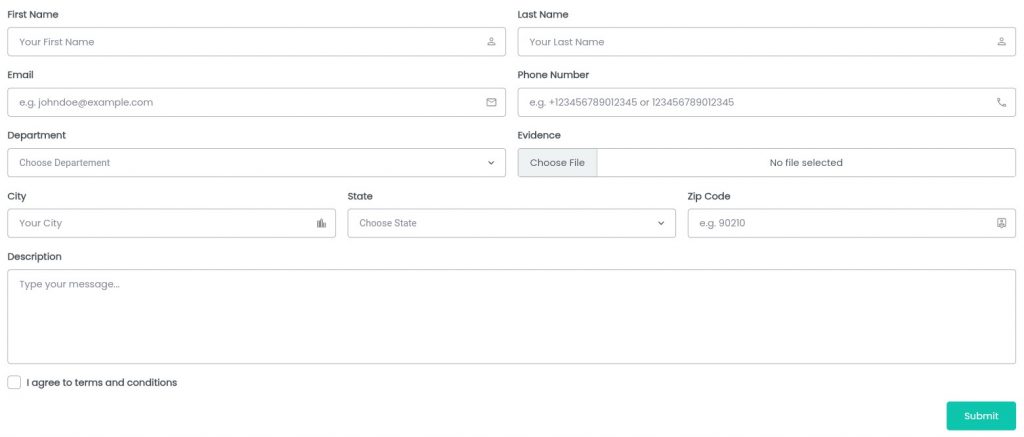
From the form image above, it can be broken down as follows:
Form
└─ Column
  ├─ ResponsiveWrap 2 Columns(First Name, Last Name, Email, Phone Number, Department, Evidence)
  ├─ ResponsiveWrap 3 Columns(City, State, Zip Code)
  ├─ TextFormField (Description)
  ├─ Checkbox
└─ ActionsWe will focus on ResponsiveWrap 2 Columns and ResponsiveWrap 3 Columns. Here is an example code:
ResponsiveWrap 2 Columns
ResponsiveWrap(
  breakpoints: {
    kScreenWidthSm: 1, // set breakpoint for 1 column layout,
    kScreenWidthMd: 2, // set breakpoint for 2 column layout
  },
  columnRatios: const [
    0.5, // set column A as 50% width
    0.5, // set column B as 50% width
  ],
  spacing: kDefaultPadding, // spacing
  runSpacing: kDefaultPadding, // run spacing
  children: [
    // first name
    Column(
      crossAxisAlignment: CrossAxisAlignment.start,
      children: [
        FormLabel(
          text: 'First Name',
          showRequired: false,
        ),
        SizedBox(
          height: kDefaultPadding / 2,
        ),
        CustomTextFormField(
          controller: firstNameController,
          hintText: 'Your First Name',
          suffixIcon: Icons.person_outline,
          validator: (value) =>
              Validators.requiredField(value, context),
          successMessage: 'Looks Good!',
        ),
      ],
    ),

    // last name
    Column(
      crossAxisAlignment: CrossAxisAlignment.start,
      children: [
        FormLabel(
          text: 'Last Name',
          showRequired: false,
        ),
        SizedBox(
          height: kDefaultPadding / 2,
        ),
        CustomTextFormField(
          controller: lastNameController,
          hintText: 'Your Last Name',
          suffixIcon: Icons.person_outline,
          validator: (value) =>
              Validators.requiredField(value, context),
          successMessage: 'Looks Good!',
        ),
      ],
    ),

    // email
    Column(
      crossAxisAlignment: CrossAxisAlignment.start,
      children: [
        FormLabel(
          text: 'Email',
          showRequired: false,
        ),
        SizedBox(
          height: kDefaultPadding / 2,
        ),
        CustomTextFormField(
          controller: emailController,

          hintText: 'e.g. johndoe@example.com',
          suffixIcon: Icons.mail_outline,
          // combining required field and email validator
          validator: Validators.combineValidators(
            [
              (value) => Validators.requiredField(value, context),
              (value) => Validators.email(value, context)
            ],
          ),
          successMessage: 'Looks Good!',
        ),
      ],
    ),

    // phone
    Column(
      crossAxisAlignment: CrossAxisAlignment.start,
      children: [
        FormLabel(
          text: 'Phone Number',
          showRequired: false,
        ),
        SizedBox(
          height: kDefaultPadding / 2,
        ),
        CustomTextFormField(
          controller: phoneNumberController,
          hintText: 'e.g. +123456789012345 or 123456789012345',
          validator: Validators.combineValidators(
            [
              (value) => Validators.requiredField(value, context),
              (value) => Validators.phone(value, context)
            ],
          ),
          suffixIcon: Icons.call_outlined,
          keyboardType: TextInputType.number,
          successMessage: 'Looks Good!',
        ),
      ],
    ),

    // Division
    Column(
      crossAxisAlignment: CrossAxisAlignment.start,
      children: [
        FormLabel(
          text: 'Department',
          showRequired: false,
        ),
        SizedBox(
          height: kDefaultPadding / 2,
        ),
        CustomDropdownFormField<String>(
          hint: Text(
            'Choose Departement',
            style: TextStyle(
              color: kTextColor,
              fontSize: kBodyMedium,
            ),
          ),
          items: const [
            DropdownMenuItem(
              value: "hrd",
              child: Text("HRD"),
            ),
            DropdownMenuItem(
              value: "it",
              child: Text("IT"),
            ),
            DropdownMenuItem(
              value: "marketing",
              child: Text("Marketing"),
            ),
          ],
          initialValue: _selectedDept,
          onChanged: (value) => setState(() => _selectedDept = value),
          validator: (value) => Validators.requiredField(
            value,
            context,
            customMessage: 'Dept must be selected',
          ),
        ),
      ],
    ),

    // Evidence
    Column(
      crossAxisAlignment: CrossAxisAlignment.start,
      children: [
        FormLabel(
          text: 'Evidence',
          showRequired: false,
        ),
        SizedBox(
          height: kDefaultPadding / 2,
        ),
        FileUploadForm(
          // combining required and file extension validators
          onFilesSelected: (files) =>
              setState(() => _evidenceFiles = files),
          validator: Validators.combineFileValidators(
            [
              (files) => Validators.fileRequired(files, context),
              (files) => Validators.fileExtension(files,
                  ['pdf', 'jpg'], context), // pdf, jpg extension only
            ],
          ),
          successMessage: 'Looks Good!',
        ),
      ],
    )
  ],
),
ResponsiveWrap 3 Columns
ResponsiveWrap(
  breakpoints: {
    kScreenWidthSm: 1, // set breakpoint for 1 column layout,
    kScreenWidthMd: 3, // set breakpoint for 3 column layout
  },
  columnRatios: const [
    1 / 3, // set column A as 1/3 width
    1 / 3, // set column B as 1/3 width
    1 / 3, // set column C as 1/3 width
  ],
  spacing: kDefaultPadding, // spacing
  runSpacing: kDefaultPadding, // run spacing
  children: [
    // City
    Column(
      crossAxisAlignment: CrossAxisAlignment.start,
      children: [
        FormLabel(
          text: 'City',
          showRequired: false,
        ),
        SizedBox(
          height: kDefaultPadding / 2,
        ),
        CustomTextFormField(
          controller: cityController,
          hintText: 'Your City',
          suffixIcon: Icons.location_city_outlined,
          validator: (value) =>
              Validators.requiredField(value, context),
          successMessage: 'Looks Good!',
        ),
      ],
    ),

    // State
    Column(
      crossAxisAlignment: CrossAxisAlignment.start,
      children: [
        FormLabel(
          text: 'State',
          showRequired: false,
        ),
        SizedBox(
          height: kDefaultPadding / 2,
        ),
        CustomDropdownFormField<String>(
          hint: Text(
            'Choose State',
            style: TextStyle(
              color: kTextColor,
              fontSize: kBodyMedium,
            ),
          ),
          items: const [
            DropdownMenuItem(
              value: "california",
              child: Text("California"),
            ),
            DropdownMenuItem(
              value: "florida",
              child: Text("Florida"),
            ),
            DropdownMenuItem(
              value: "texas",
              child: Text("Texas"),
            ),
          ],
          initialValue: _selectedState,
          onChanged: (val) => setState(() => _selectedState = val),
          validator: (value) => Validators.requiredField(
            value,
            context,
            customMessage: 'State must be selected',
          ),
        ),
      ],
    ),

    // zip code

    Column(
      crossAxisAlignment: CrossAxisAlignment.start,
      children: [
        FormLabel(
          text: 'Zip Code',
          showRequired: false,
        ),
        SizedBox(
          height: kDefaultPadding / 2,
        ),
        CustomTextFormField(
          controller: zipController,
          hintText: 'e.g. 90210',
          validator: FormBuilderValidators.zipCode(),
          suffixIcon: Icons.location_history_outlined,
          keyboardType: TextInputType.number,
          successMessage: 'Looks Good!',
        ),
      ],
    ),
  ],
),Demo
You can preview several form layout demo and behaviors in the FlutKit demo application.
Forms → Form Layout
Summary
ResponsiveWrap is not just a layout widget—it is a form architecture tool in FlutKit.
It enables:
- Clean responsive logic
- Scalable form design
- Consistent UI across screen sizes
- Easier long-term maintenance
