
The software development landscape is undergoing a monumental transformation. We are moving away from traditional, manual coding processes and entering the era of Agentic AI. For cross-platform developers using Flutter, this shift doesn’t just mean faster auto-complete; it means deploying autonomous AI agents that can reason, plan, execute, and iterate upon complex development tasks.
If you want to build a Flutter application today, leveraging an agentic AI workflow can reduce your time-to-market from months to mere days. This comprehensive, 2500-word guide will walk you through the complete lifecycle of building a Flutter app using Agentic AI—from the initial spark of an idea, through UI design and the emerging philosophy of “vibe coding,” all the way to testing and deployment.
The Paradigm Shift: What is Agentic AI in Software Development?
Before diving into the workflow, it is crucial to understand what separates “Agentic AI” from standard generative AI. Standard AI (like early versions of ChatGPT) acts as an oracle: you ask a question, and it provides an answer.
Agentic AI, on the other hand, acts as a digital co-worker. Tools like Cursor, GitHub Copilot Workspace, and Claude 3.5 Sonnet integrated into IDEs can:
- Analyze Context: Read your entire Flutter project directory.
- Plan Iterations: Break down a feature request into actionable steps.
- Execute Code: Write the Dart code, update state management files, and modify UI widgets simultaneously.
- Self-Correct: Read error logs and fix bugs autonomously before you even run the app.
By adopting an agentic workflow, you transition from being a traditional programmer to a technical director. You manage the agents, define the architecture, and ensure the final product aligns with your vision.
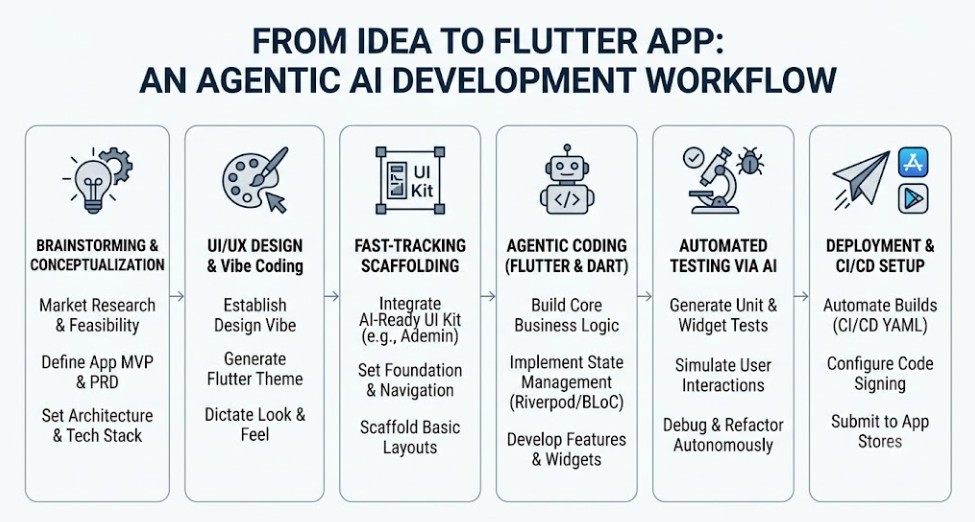
Phase 1: Brainstorming and Conceptualization
Every great Flutter app begins with a solid idea. In the agentic workflow, AI doesn’t just write the code; it helps you validate the concept and draft the blueprint.
1. Market Research and Feature Mapping
Start by using conversational AI models (like Gemini or Claude) to validate your app idea. Instead of just asking for a list of features, prompt the AI to act as a Product Manager.
Example Prompt:
“Act as an expert Product Manager. I want to build a cross-platform Flutter application for [insert niche]. Analyze the current market gaps, suggest a core value proposition, and provide a prioritized feature list (MVP vs. V2.0). Format the output as a Product Requirements Document (PRD).”
2. Architecture and Tech Stack Selection
Once your features are mapped out, use the AI to determine the best technical approach for your Flutter app. An agentic AI can help you decide on state management, routing, and backend integrations.
Example Prompt:
“Based on the PRD we just created, suggest the most scalable architecture for this Flutter app. Compare Riverpod and BLoC for this specific use case, recommend a routing package (e.g., GoRouter), and suggest a Backend-as-a-Service (BaaS) that integrates seamlessly with Flutter.”
By the end of Phase 1, you should have a comprehensive PRD and a defined architecture document. These documents will serve as the “system instructions” for your AI coding agents in the later phases.
Phase 2: UI/UX Design and the Art of “Vibe Coding”
Designing the user interface is where the human element becomes most critical in an AI-driven workflow. While AI can generate code, human intuition dictates the user experience. This brings us to a revolutionary concept in modern development: vibe coding.
What is Vibe Coding?
Vibe coding is a development philosophy where the developer focuses entirely on the overarching architecture, the visual design system, and the overall “feel” (the vibe) of the application, while delegating the repetitive boilerplate and syntax generation to AI agents.
Instead of agonizing over Padding, Margin, or the exact constraints of a SizedBox, you focus on thoughtful UI and clean user journeys. You define the aesthetic harmony, and the AI translates that vision into pixel-perfect Flutter widgets.
Generating Design Systems with AI
To execute vibe coding successfully, you need a robust design system. You can prompt an AI to generate a complete Flutter theme protocol.
Example Prompt:
“Create a comprehensive Flutter
ThemeDataclass for a modern, minimalist application. Include a custom color palette (primary, secondary, surface, error), typography settings using Google Fonts, and standardized input decoration themes for text fields. Ensure the code is clean and highly maintainable.”
The AI will output a fully structured AppTheme class. As a “vibe coder,” your job is to review this output, tweak the hex codes to match your brand’s mood, and ensure the UI feels right.
Phase 3: Fast-Tracking Scaffolding with AI-Ready Kits
One of the biggest bottlenecks in Flutter development is scaffolding the initial layout—especially for complex applications like admin panels, SaaS dashboards, or CRM systems.
When you are using an Agentic AI workflow, starting from absolute scratch can disrupt the momentum. AI agents perform exponentially better when they have a clean, modular foundation to build upon. If the AI has to invent the basic navigation drawer, the app bar, and the responsive layout from zero, it is prone to hallucinating inconsistent UI patterns.
The Power of an AI-Ready Dashboard Flutter UI Kit
To achieve maximum efficiency, modern developers leverage pre-built, highly modular UI kits. However, not all UI kits are created equal. You need an AI-ready Dashboard Flutter UI Kit—one that features clean architecture, readable widget trees, and explicit state separation so your AI agents can easily parse and modify the code.
For instance, if you are building a robust backend interface or an analytics dashboard, integrating Ademin by FlutKit is a game-changer. Ademin is designed with maintainability at its core. Because its components are thoughtfully structured and completely modular, an AI coding agent like Cursor can effortlessly read the existing codebase and scaffold new pages that perfectly match the existing design language.
How to integrate a UI Kit into your Agentic Workflow:
- Import the Kit: Add the AI-ready kit (like Ademin) to your Flutter project.
- Feed the Context: Open your AI IDE (e.g., Cursor) and add the UI kit’s foundational files to the AI’s context window.
- Prompt for Expansion: Instruct the AI to build upon the kit.
- “@workspace Read the layout structure of the Ademin dashboard template. Create a new screen called
AnalyticsViewthat follows the exact same responsive padding and card styles used in theDashboardHomescreen. Add a line chart widget inside a standard Ademin card.”
- “@workspace Read the layout structure of the Ademin dashboard template. Create a new screen called
By providing a high-quality foundation, you allow the AI to focus on generating unique business logic and custom features rather than reinventing standard UI components.
Phase 4: The Agentic Coding Phase (Flutter & Dart)
With the brainstorming complete, the vibe established, and the scaffolding in place, it is time to write the core logic. This is where Agentic AI truly shines.
Tools like Cursor (powered by Claude 3.5 Sonnet or GPT-4o) allow you to use a feature called “Composer” or “Agent Mode,” where the AI can create, edit, and delete multiple files across your project simultaneously.
1. Setting Up State Management
State management is notoriously tricky to wire up manually. With an agentic workflow, you describe the required state, and the AI handles the boilerplate.
Example Prompt (using Riverpod):
“Create a Riverpod
AsyncNotifiercalledUserProfileNotifier. It should fetch user data from a mock repository, handle loading and error states, and include a method to update the user’s profile picture. Generate the notifier, the state class, and the repository interface in separate files.”
The AI will generate the user_profile_notifier.dart, user_state.dart, and user_repository.dart instantly. It ensures that the syntax is correct for the latest version of Riverpod, saving you hours of documentation hunting.
2. Building Complex Business Logic
Agentic AI is exceptional at translating plain English business rules into Dart code.
Let’s say you are building an e-commerce app and need a complex cart calculation algorithm.
Example Prompt:
“Write a Dart class for calculating a shopping cart total. The logic must include: a 10% discount if the cart has more than 5 items, an additional $5 off if a promo code ‘WELCOME’ is applied, and an automatic 8% tax applied after all discounts. Include edge cases for empty carts and negative values.”
3. Iterative Refinement and “Chatting with your Code”
The hallmark of Agentic AI is the iterative loop. You don’t just accept the first output; you converse with the agent to refine it.
- You: “The cart layout looks good, but the checkout button is too small on mobile.”
- AI Agent: “I understand. I will update the
ElevatedButtonstyle incart_view.dartto haveminimumSize: const Size.fromHeight(50)to ensure it spans the full width and is easily tappable on mobile devices.” (AI applies the change instantly).
This conversational approach perfectly aligns with the vibe coding philosophy—you dictate the flow and feel, while the AI manages the precise constraints and syntax.
Phase 5: Automated Testing via AI
Testing is often the most neglected part of app development because writing tests is time-consuming. However, a complete AI development workflow transforms testing from a chore into a seamless automated process.
Unit Testing
AI excels at writing unit tests because the logic is usually self-contained. Once you have a business logic class, you can instruct the AI to generate a comprehensive test suite.
Example Prompt:
“Generate a complete suite of unit tests for the
ShoppingCartCalculatorclass we just created. Use thetestpackage. Ensure you cover all edge cases, including empty carts, invalid promo codes, and floating-point precision issues.”
Widget Testing
Widget testing in Flutter requires finding specific elements in the widget tree and simulating user interactions. Agentic AI can read your UI files and automatically write the corresponding widget tests.
Example Prompt:
“Write a widget test for
LoginScreen. Verify that the email and password text fields are present. Simulate entering text into both fields, tapping the ‘Submit’ button, and verify that aCircularProgressIndicatorappears while the mock authentication is processing.”
Debugging with AI Agents
When a test fails, the agentic workflow shines again. Instead of pasting error logs into a separate browser window, you simply highlight the failed test in your IDE and ask the AI agent:
“This test is failing with a ‘Widget not found’ exception. Analyze the widget tree in
LoginScreenand fix the test or the UI code so it passes.”
The AI will read the context, identify that a Key might be missing or an animation is blocking the tap, and automatically apply the fix.
Phase 6: Deployment & CI/CD Setup
The final hurdle in taking an idea to a published Flutter app is deployment. Configuring iOS certificates, Android keystores, and CI/CD pipelines (Continuous Integration / Continuous Deployment) can be incredibly frustrating. AI can automate the configuration of these pipelines.
Generating GitHub Actions or Codemagic YAML
You can use Agentic AI to write the complex YAML configuration files required for automated deployment.
Example Prompt:
“Write a GitHub Actions workflow YAML file for my Flutter project. The workflow should trigger on pushes to the
mainbranch. It needs to setup Java, setup Flutter (latest stable), runflutter pub get, run all tests, build an Android App Bundle (AAB), and build an iOS IPA. Include placeholders for the necessary secrets.”
Navigating App Store Guidelines
Deployment isn’t just technical; it’s administrative. Before submitting your app, you can use conversational AI to verify that your app aligns with the Apple App Store and Google Play Store guidelines. You can feed your app’s description, privacy policy, and feature list into the AI and ask:
“Review this app description and feature list against the latest Apple App Store Review Guidelines. Flag any potential reasons for rejection, especially regarding user-generated content and data privacy.”
Conclusion: The Future of Flutter Development
Moving from an idea to a fully functional, production-ready Flutter app has never been faster. The Agentic AI workflow is not about replacing developers; it is about elevating them.
By utilizing AI for market research, embracing the vibe coding philosophy for design, leveraging an AI ready Dashboard Flutter UI Kit like Ademin for rapid scaffolding, and deploying autonomous agents for logic and testing, you remove the friction from software development.
You are no longer just writing code line by line. You are architecting solutions, directing intelligent agents, and focusing on creating exceptional user experiences. The future of Flutter development is agentic, and the developers who master this workflow today will be the ones building the industry-leading applications of tomorrow.
Frequently Asked Questions (FAQ)
1. Does using AI code generation make my Flutter app slower?
No. AI generates standard Dart and Flutter code. The performance of your app depends on the architecture and the quality of the code generated. By prompting the AI to adhere to best practices (like const constructors, proper state management, and avoiding unnecessary rebuilds), your app will be just as fast—if not faster—than human-written code.
2. Can AI handle native integrations (Swift/Kotlin) in Flutter?
Yes. Advanced agentic AI models have been trained on vast repositories of Swift, Objective-C, Kotlin, and Java. If you need a custom platform channel or need to modify the AppDelegate.swift or MainActivity.kt files, you can prompt the AI to write the native code and the Dart interface simultaneously.
3. What is the best IDE for an Agentic AI workflow in Flutter?
Currently, Cursor is highly recommended for Flutter developers as it offers deep codebase indexing and a built-in agentic composer. GitHub Copilot integrated into VS Code is also incredibly powerful. Both allow you to keep your hands on the keyboard while directing the AI to modify your project.
4. How do I maintain code security when using Agentic AI?
Always ensure you do not hardcode sensitive API keys, secrets, or database passwords in your project files, as these can be read by the AI (and potentially sent to cloud servers depending on your IDE settings). Use .env files and prompt the AI to implement secure storage solutions like flutter_secure_storage.
5. Why should I use a UI Kit if AI can write UI code?
While AI can write UI code, it lacks the innate ability to maintain a massive, cohesive design system from scratch without constant micromanagement. Starting with an AI-ready kit provides a structured, well-documented baseline. It prevents the AI from hallucinating inconsistent designs and allows it to focus on building complex business logic and custom features on top of a solid, professional foundation.