
The era of typing every single Flutter widget line by line is officially behind us.
For years, developers relied on first-generation AI assistants like early Copilot for inline autocompletion and basic function generation. While helpful, these tools acted like basic predictive text on steroids—offering suggestions one line at a time while requiring humans to connect all the dots, structure the architecture, and resolve build errors manually.
Today, we have entered the age of Agentic AI Coding.
Unlike passive code completers, AI coding agents (such as Cursor Agent, Windsurf, Claude Code, and Google Antigravity) act as autonomous engineering partners. They can inspect multi-file codebases, plan complex architectural updates, modify dozens of files across your project, execute terminal commands (flutter pub get, flutter test, flutter analyze), and self-correct when build errors arise.
When paired with Flutter’s declarative UI model, strongly typed Dart language, and modular ecosystem, Agentic AI creates an unprecedented multiplier in developer velocity.
In this comprehensive guide, we will break down how you can leverage Agentic AI to build, test, and ship Flutter applications 3x faster without sacrificing code quality, maintainability, or architectural integrity.
1. Autocomplete vs. Agentic AI: The Fundamental Shift
To understand how to triple your output, you must first understand the fundamental shift in how developer tooling interacts with your Flutter codebase.
THE AI DEVELOPMENT EVOLUTION
Generation 1: Chatbots (2022): Copying and pasting code back and forth from ChatGPT into IDEs.
Generation 2: Inline Autocomplete (2023–2024): Ghost-text suggestions predicting the next line or short block of code.
Generation 3: Agentic AI Workflows (2025–2026): Autonomous execution across multi-file structures, terminal automation, self-correction via Dart analyzer, and spec-driven orchestration.
The Difference in Action
| Dimension | Legacy AI Assistants (Autocomplete) | Agentic AI Coding (Autonomous) |
| Scope of Work | Single-file edits or isolated inline suggestions. | Multi-file feature orchestration, state management, and repository updates. |
| Context Awareness | Limited to active file and recent tab buffers. | Full repository indexing, custom project rules, and Model Context Protocol (MCP) integrations. |
| Execution Power | Purely text generation in the editor. | Modifies files, creates directories, runs shell commands, and analyzes logs. |
| Error Handling | Leaves compilation errors for the developer to fix manually. | Runs flutter analyze, catches errors autonomously, and iterates until resolved. |
| Developer Role | Primary Typist + Manual Integrator. | Architect, Prompt Engineer, and Code Reviewer. |
Key Takeaway: Autocomplete helps you type faster. Agentic AI helps you build faster by handling entire engineering sub-tasks on your behalf.
2. Why Flutter is Uniquely Built for Agentic Workflows
Not all frameworks adapt equally to agentic workflows. Frameworks with fragmented ecosystems or loose syntax often lead AI agents down rabbit holes of non-working code.
Flutter, however, provides an ideal canvas for AI agents due to four structural characteristics:
1. Strongly Typed Dart Ecosystem
Dart’s sound null safety and strong static typing provide continuous feedback to an AI agent. When an agent generates code, the Dart compiler immediately flags type mismatches, missing parameters, or nullability issues. Agents leverage this feedback loop to self-correct in seconds.
2. Declarative UI Tree
In Flutter, UI is a function of state ($UI = f(State)$). Everything is a Widget, arranged in an explicit, hierarchical tree structure. This structural predictability allows AI agents to read, understand, and construct complex user interfaces far more accurately than imperatively manipulated DOM environments.
3. Rapid Feedback via Hot Reload & CLI Tooling
Flutter’s developer tooling (flutter build, flutter test, flutter analyze, and dart fix) is fast and deterministic. An AI agent running in a CLI or IDE terminal can invoke these tools instantly to verify whether its code compiles and passes tests before handing it over for human review.
4. Standardized State Management Patterns
Whether your team uses Riverpod, BLoC, or Provider, Flutter’s community relies on clear, structured patterns. When paired with proper prompt rules, AI agents can effortlessly generate boilerplates, state providers, and UI bindings following exact project conventions.
3. The 3x Velocity Framework: 4 Phases of Agentic Flutter Development
To achieve a true 3x reduction in development time—turning a 30-hour sprint feature into a 10-hour implementation—you need a structured execution framework.
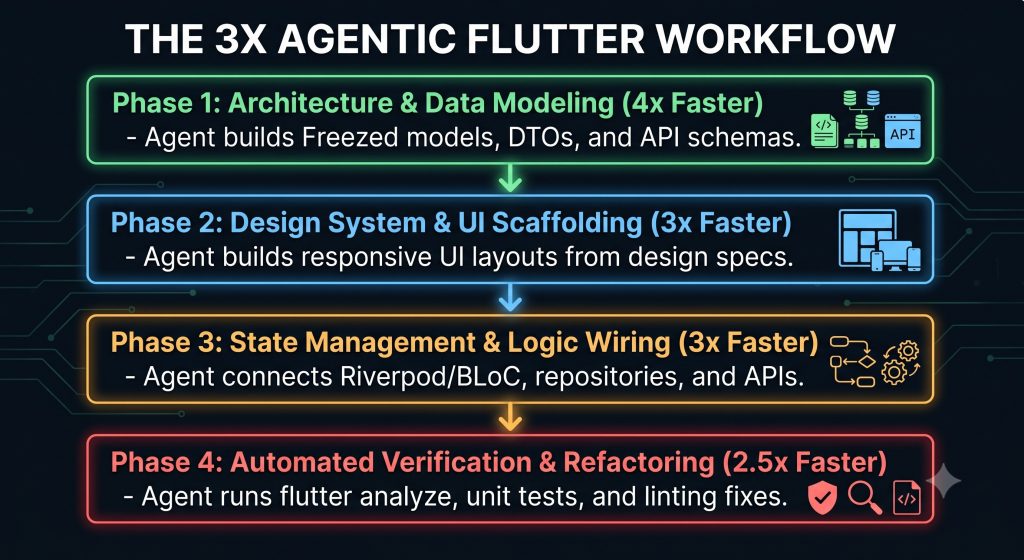
Phase 1: Architecture & Data Modeling (4x Speedup)
Defining data models, JSON serialization, and entity mapping is historically repetitive work. With Agentic AI, this entire layer can be generated in a single turn.
How to execute:
Provide your agent with a raw JSON response or API specification and instruct it to build immutable domain models using Freezed and JsonSerializable.
# Example Agent Task
"Read the API payload from 'assets/mock/user_profile.json'.
Generate an immutable Freezed model in 'lib/features/profile/domain/user_profile.dart'.
Include custom json converters for DateTime fields and write a unit test checking serialization."
What the Agent Handles Autonomously:
- Creates
user_profile.dartanduser_profile.g.dartannotations. - Invokes
dart run build_runner build --delete-conflicting-outputsin the terminal. - Fixes any missing imports or model references across dependent files.
Phase 2: Design System & UI Scaffolding (3x Speedup)
Building Flutter screens from scratch often involves spending hours tweaking SizedBox, Padding, Column, Row, and custom colors.
By feeding your AI agent a structured UI design system or pre-built UI component kit, you bypass the mechanical widget assembly stage completely.
The Power of “AI-Ready” UI Kits & Design Tokens
If your codebase utilizes standard tokens (Theme.of(context).colorScheme) or modular UI kits, the agent can compose screens using pre-built, tested UI building blocks instead of inventing new widgets from scratch.
// Example: Directing the agent to scaffold a UI using project tokens
"Create a new responsive screen 'AnalyticsDashboardScreen' in 'lib/features/analytics/presentation/'.
Use custom cards from 'lib/core/components/custom_card.dart'.
Ensure all padding uses 'AppSpacing.md' and color references use 'context.colorScheme'."
The agent instantly generates the scaffold, app bar, layout grids, cards, dynamic charts, and responsive breakpoint checks (Mobile/Desktop/Web) in seconds.
If you’re looking for a production-ready foundation, Ademin by FlutKit provides a modular dashboard architecture, reusable widgets, responsive layouts, and design-token-based components that work exceptionally well with AI-assisted development. Instead of generating every widget from scratch, AI agents can assemble interfaces from a consistent, battle-tested component library.
Phase 3: State Management & API Integration (3x Speedup)
Wiring up business logic requires strict adherence to project architecture (e.g., Clean Architecture, Feature-first structure).
Agentic State Wiring with Riverpod
An AI agent armed with your architectural guidelines can generate notifier classes, async state handlers, and repository implementations in parallel.
// Generated by Agentic AI based on Riverpod specs
@riverpod
class AnalyticsNotifier extends _$AnalyticsNotifier {
  @override
  FutureOr<AnalyticsState> build() async {
    return _fetchInitialData();
  }

  Future<void> refreshMetrics() async {
    state = const AsyncValue.loading();
    state = await AsyncValue.guard(() async {
      final repository = ref.read(analyticsRepositoryProvider);
      return await repository.getDashboardData();
    });
  }
}The agent will simultaneously:
- Create the repository interface in
domain/. - Implement the network call via Dio in
infrastructure/. - Build the Riverpod notifier in
application/. - Wire the notifier state directly into the UI widgets created in Phase 2.
Phase 4: Automated Testing & Verification (2.5x Speedup)
The greatest bottleneck in AI-assisted coding is verifying whether generated code actually works without introducing regressions. Agentic AI solves this by taking operational ownership of tests and linter rules.
THE AGENTIC AUTONOMOUS SELF-CORRECTION LOOP
- Agent writes or modifies code across multiple Flutter files.
- Agent executes: `flutter analyze` in terminal.
- Analyzer returns 3 deprecation warnings and 1 missing override.
- Agent reads terminal feedback directly.
- Agent fixes errors and re-runs `flutter analyze` until 0 warnings remain.
- Agent runs `flutter test` to ensure zero regression.
This automated loop ensures that by the time you review the pull request, the code is already formatted, linted, and passing unit tests.
4. Mastering Context: Rules, Skills, and MCP in Flutter
An AI agent is only as smart as the context you provide it. Without clear guardrails, an agent will fall back on generic training data, generating outdated state management solutions or messy, monolithic widgets.
To achieve maximum efficiency, set up a project-level configuration system using Rules, Skills, and Model Context Protocol (MCP) servers.
Setting Up Project Rules (.cursorrules or .windsurfrules)
Place a dynamic rules file at the root of your Flutter project. This acts as the agent’s operating system every time it interacts with your code.
Example Flutter Rule Specification:
# Flutter & Dart Architectural Guidelines

## Core Principles
1. Architecture: Follow Feature-First Clean Architecture (domain, presentation, data).
2. State Management: Use Riverpod 3.3 with code generation (@riverpod). Never use setState in non-trivial widgets.
3. Immutability: Use Freezed for all domain models and states.
4. UI Guidelines:
   - Split UI components into small, reusable widgets (< 100 lines per file).
   - Use `Theme.of(context)` for colors and typography. Avoid hardcoded `Color(0xFF...)`.
   - Always handle AsyncValue states using `.when()` or `.maybeWhen()`.
5. Testing: Every new notifier must have a corresponding test file in `test/features/`.

## Quality Enforcement
- After creating or modifying files, execute `flutter analyze`.
- Resolve all warnings and static analysis issues before declaring a task complete.Leveraging Dart & Flutter MCP Servers
The Model Context Protocol (MCP) allows AI agents to interact directly with internal developer tools. By connecting a Dart/Flutter MCP server, your agent gains live capabilities:
- Querying official Flutter/Dart API documentation in real-time.
- Running widget tests directly in isolated headless environments.
- Reading runtime logs from running Flutter emulators.
5. Case Study: Building a Dashboard Screen in 15 Minutes
To see this workflow in practice, let’s walk through building a production-ready E-Commerce Sales Analytics Screen using an Agentic AI workflow.
       15-MINUTE AGENTIC DEVELOPMENT BREAKDOWN

┌───────────────────────┬─────────────────────────────────────────────────┐
│ Time Interval         │ Task Handled by Agent                           │
├───────────────────────┼─────────────────────────────────────────────────┤
│ Minute 00:00 - 02:00  │ Prompting & Spec Definition                     │
│ Minute 02:00 - 05:00  │ Freezed Models & Mock Data Generation           │
│ Minute 05:00 - 09:00  │ Responsive UI Layout & Chart Component Creation │
│ Minute 09:00 - 12:00  │ Riverpod Provider & Repository Wiring           │
│ Minute 12:00 - 15:00  │ Automated Refactoring & Static Analysis Fixes   │
└───────────────────────┴─────────────────────────────────────────────────┘
Step 1: The Master Spec Prompt
Instead of issuing tiny commands, we provide the agent with a complete feature specification:
Agent Specification:
Build a new sales analytics dashboard feature inside lib/features/analytics.

1. Domain: Create a SalesMetric model (totalRevenue, totalOrders, averageOrderValue, monthlyData) using Freezed.

2. Data: Create MockAnalyticsRepository that returns sample data with a 1-second delay.

3. State: Create a Riverpod AsyncNotifier named AnalyticsController.

4. UI: Build SalesAnalyticsScreen using the existing Analytics Dashboard template located in lib/demo/dashboard/analytics as the foundation. Reuse the existing layout, components, charts, and design patterns whenever possible instead of creating new widgets.

5. Verification: Run flutter analyze and ensure all warnings are resolved.Step 2: The Agent Executes
The AI agent begins its multi-file execution sequence:
- Creates File 1:
domain/sales_metric.dart+ runs code builder. - Creates File 2:
data/mock_analytics_repository.dart. - Creates File 3:
presentation/controllers/analytics_controller.dart. - Creates File 4:
presentation/widgets/kpi_card_widget.dart. - Creates File 5:
presentation/sales_analytics_screen.dart.
Step 3: Self-Correction Loop
During compilation, the agent detects an unused import and an unhandled AsyncError state in the widget tree.
It opens the terminal autonomously, reads the analyzer output, adds the missing error widget handler, removes unused imports, and finishes execution.
Total time elapsed: 14 minutes, 20 seconds. Hand-coding this screen and its test suites traditionally takes 3–4 hours.
6. Avoiding the “AI Slop” Trap: Best Practices for Clean Code
While Agentic AI dramatically speeds up development, unguided agents can produce messy, redundant, or unmaintainable code—often referred to as AI Slop.
To maintain codebase health while building at 3x speed, adhere to these three core principles:
+-----------------------------------------------------------------------------------+
|                       THE TRIAD OF HIGH-QUALITY AGENTIC CODE                      |
+-----------------------------------------------------------------------------------+
|                                                                                   |
|                   [ 1. Modular Design Systems ]                                   |
|                     /                       \                                     |
|                    /                         \                                    |
|                   /                           \                                   |
|  [ 2. Strict Linter Rules ] <───────────> [ 3. Human Code Review ]                |
|  (very_good_analysis)                     (Architectural Verification)            |
|                                                                                   |
+-----------------------------------------------------------------------------------+
1. Maintain Modular Architecture
Never allow the AI agent to write massive 500-line single-file screens. Enforce strict widget decomposition rules. If a component exceeds 100 lines, instruct the agent to break it down into modular child widgets.
2. Enforce very_good_analysis
Adopt strict linter configs like Very Good Ventures’ very_good_analysis package. Strict lint rules serve as automated “guardrails” that prevent AI agents from applying anti-patterns, using deprecated widgets, or omitting dynamic type declarations.
3. Act as the Lead Architect, Not a Passive Observer
You remain responsible for the architecture. Never blindly merge agentic pull requests. Review diffs with a focus on:
- Are data streams properly disposed of?
- Are context boundaries respected across asynchronous gaps?
- Are state providers scoped correctly to avoid memory leaks?
7. The Agentic Tooling Ecosystem for Flutter Engineers
To get started today, equip your workspace with the leading agentic AI tools optimized for Dart and Flutter development:
+-----------------------------------------------------------------------------------+
|                        AGENTIC TOOLSTACK FOR FLUTTER DEVELOPERS                   |
+-----------------------------------------------------------------------------------+
|  Category                | Recommended Tools                                      |
+--------------------------+--------------------------------------------------------+
|  Agentic IDEs            | Cursor, Windsurf (by Cognition)                        |
|  CLI & Terminal Agents   | Claude Code CLI, Antigravity CLI                       |
|  AI App & UI Scaffolding | Google Stitch, Antigravity IDE                         |
|  Protocol & Rules        | Model Context Protocol (MCP), .cursorrules / skills    |
|  Quality Enforcers       | Flutter Analyze, Custom Lint, Very Good Analysis       |
+-----------------------------------------------------------------------------------+
- Cursor Agent: Excellent for multi-file workspace modifications, refactoring tasks, and running local execution commands with granular approval controls.
- Windsurf: Ideal for deep repository comprehension, context reasoning, and inline architectural guidance.
- Claude Code / Terminal Agents: Outstanding for autonomous multi-file terminal tasks, executing
flutter testsuits, and managing Git feature branch commits. - Google Antigravity & Stitch: Web and desktop tooling tailored for Flutter app generation, layout automation, and direct design-to-code orchestration.
8. Conclusion: Transitioning to the AI Orchestrator Era
Agentic AI coding is not replacing Flutter developers—it is liberating them.
By shifting your daily routine away from writing repetitive boilerplate and widget scaffolding, you can elevate your role to that of an Engineering Architect and Product Orchestrator.
When you combine clear architectural conventions, automated analyzer guardrails, and agentic AI capabilities, shipping polished, cross-platform Flutter applications at 3x speed becomes the new baseline standard.
Set up your project rules, configure your AI workspace, and build your next Flutter app at agentic speed.