
As Flutter applications continue to grow in complexity, many developers face the same challenges:
- Large and difficult-to-maintain screens
- Mixed responsibilities between UI and business logic
- Duplicate components across modules
- Inconsistent project structures
- Slow onboarding for new developers
- AI coding assistants struggling to understand project context
Over the past few months, I have been refactoring my Flutter projects and templates to address these challenges. The result is a more scalable architecture that not only improves maintainability but also works better with modern AI-assisted development workflows.
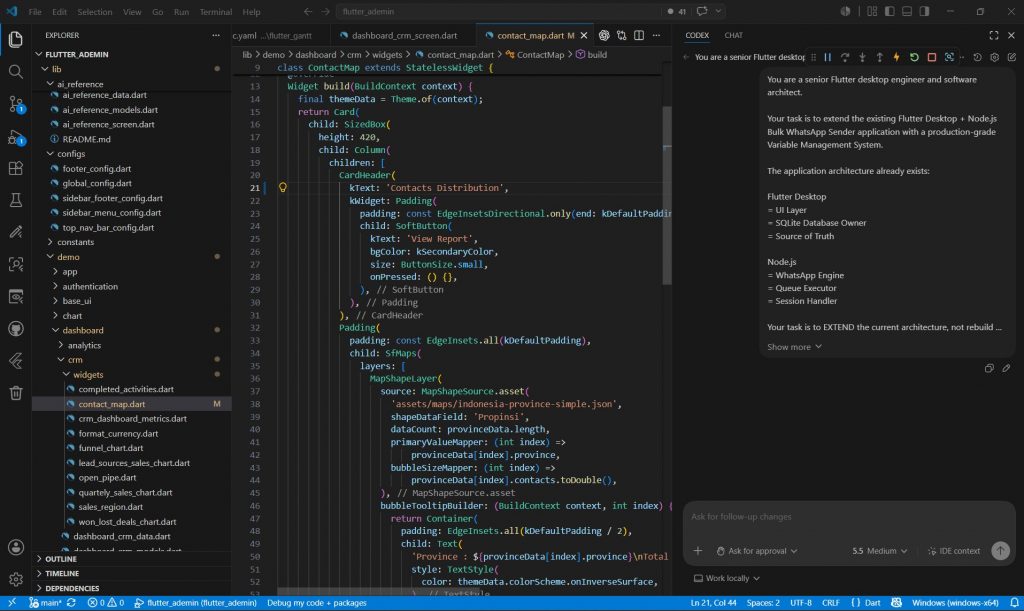
In this article, I’ll share the architectural approach, folder organization, and documentation strategy that I now use across applications, dashboards, and reusable Flutter templates.
Why Traditional Project Structures Start to Break Down
Most Flutter projects begin with a simple structure:
lib/
├── screens/
├── widgets/
├── models/
└── services/
While this works well for small applications, it often becomes problematic as the project grows.
Common issues include:
- Screens becoming thousands of lines long
- Widgets depending directly on repositories
- Models scattered throughout the project
- Dialogs embedded inside screen files
- Difficult navigation between related files
As the codebase expands, maintainability becomes increasingly challenging.
The Goal: Strong Separation of Concerns
The primary objective of the refactor was to create clear boundaries between responsibilities.
Instead of grouping files by file type globally, each feature now contains its own organized structure.
feature/
├── screens/
├── widgets/
├── dialogs/
├── models/
├── data/
This approach keeps everything related to a feature in one place while still maintaining clear architectural separation.
Organizing Screens
Screens should focus on presentation and user interaction.
Their responsibilities include:
- Page layout
- Navigation
- State consumption
- Event handling
Screens should avoid containing:
- Complex business logic
- Repository implementations
- Data transformation code
Example:
screens/
├── dashboard_screen.dart
├── user_list_screen.dart
└── settings_screen.dart
This keeps screens lightweight and easier to maintain.
Centralizing Data Management
The data layer contains everything related to data retrieval and management.
data/
├── repositories/
├── services/
├── mock_data/
└── data_sources/
Responsibilities include:
- API communication
- Mock data
- Local storage
- Repository implementations
- Data mapping
Keeping data concerns isolated helps prevent UI components from becoming tightly coupled to backend implementations.
Keeping Models in One Place
Models represent the structure of application data.
models/
├── user.dart
├── dashboard_stat.dart
└── notification_item.dart
Centralizing models makes them easier to discover and reuse across features.
This becomes especially valuable in large applications where multiple screens depend on the same entities.
Reusable Widgets as First-Class Citizens
Reusable widgets are one of Flutter’s greatest strengths.
Instead of embedding UI components directly inside screens, widgets are extracted into dedicated folders.
widgets/
├── dashboard_card.dart
├── user_avatar.dart
├── custom_table.dart
└── stat_tile.dart
Benefits include:
- Reduced duplication
- Easier testing
- Better consistency
- Faster development
Separating Dialogs from Screens
Dialogs often start small but quickly grow into complex components.
A common pattern is to place dialogs directly inside screen files.
For larger applications, this becomes difficult to manage.
Instead:
dialogs/
├── delete_user_dialog.dart
├── edit_profile_dialog.dart
└── create_project_dialog.dart
Each dialog becomes a standalone component that can be reused across the application.
Designing for AI-Assisted Development
One of the more interesting aspects of this refactor was optimizing the project structure for AI coding assistants.
Modern AI tools perform better when:
- Responsibilities are clearly separated
- Naming conventions are consistent
- Context is easy to discover
- Architectural patterns are explicit
To support this, I introduced a dedicated reference implementation.
ai_reference/
├── dialogs/
├── widgets/
├── ai_reference_data.dart
├── ai_reference_models.dart
├── ai_reference_screen.dart
└── README.md
This module acts as a living example of recommended architecture and coding patterns.
Developers can reference it directly, while AI assistants can use it as contextual guidance when generating new code.
AI-Focused Documentation
Another addition was creating documentation specifically designed for AI-assisted workflows.
docs/
├── ai_prompt_template.md
├── ai_screen_checklist.md
└── ai_ui_rules.md
These documents help establish consistency across generated code.
Topics include:
Prompt Templates
Standardized prompts for creating:
- New screens
- Dialogs
- Widgets
- Data models
Development Checklists
Ensuring generated screens follow project standards.
UI Rules
Defining:
- Layout conventions
- Spacing systems
- Component usage
- Naming standards
The result is more predictable AI-generated code and fewer manual corrections.
Benefits Observed After Refactoring
After applying this architecture across applications, dashboards, and page modules, several improvements became immediately noticeable.
Better Maintainability
Code is easier to locate and update.
Improved Scalability
New features fit naturally into the existing structure.
Faster Onboarding
Developers can understand the project more quickly.
Reduced Duplication
Reusable components are easier to discover.
Improved Consistency
Architecture remains uniform across the entire codebase.
Better AI Integration
AI-generated code aligns more closely with project standards.
Final Thoughts
The rise of AI-assisted development is changing how we think about software architecture.
Project structures that were designed solely for human developers may not be optimal when AI tools are part of the workflow.
By combining:
- Strong separation of concerns
- Feature-based organization
- Clear documentation
- Reference implementations
- AI-focused guidelines
it becomes possible to build Flutter projects that are easier to maintain, scale, and extend—whether the code is written by humans, AI assistants, or a combination of both.
As Flutter applications continue to grow in size and complexity, architecture remains one of the most important investments a development team can make.
The introduction of AI-assisted workflows simply makes that investment even more valuable.
What architectural patterns are you currently using in large Flutter projects? Have you made any changes to accommodate AI coding assistants? I’d love to hear your experiences and insights.